Replace keywords in Word documents in seconds.
Upload your document, replace placeholders like {{Name}}, {{Address}}, or {{Date}}, and download the finished file instantly, either as a one-time privacy-first session or by saving reusable templates for future use.
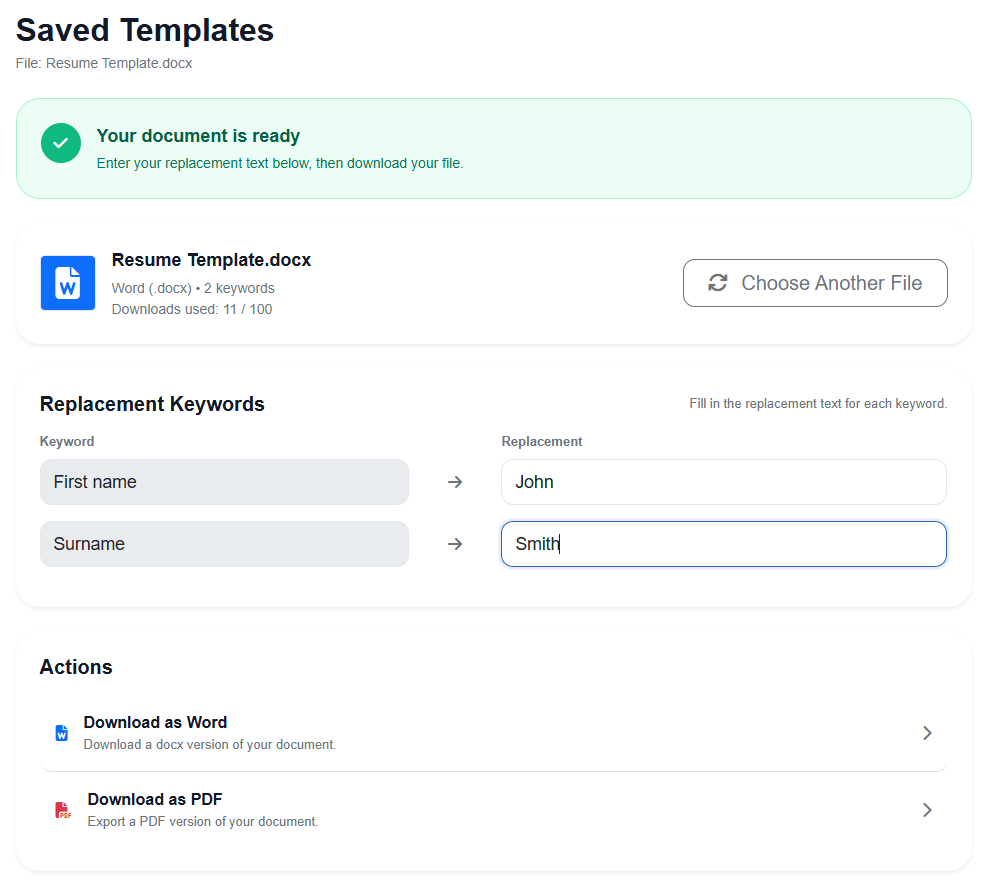
Two ways to use TextReplacer
Choose the workflow that fits your team, whether you need a one-time privacy-first document session or reusable saved templates for repeated work.
Instant Replace
Upload a DOCX file with placeholder {{keywords}}, replace placeholders, and download the finished document without saving the template to your account.
Best for one-off jobs, privacy-focused workflows, and documents you do not want stored for reuse.
Saved Templates
Upload and store your DOCX templates with placeholder {{keywords}} so they are ready to reuse whenever you need them again.
Best for repeated business workflows where your team regularly generates the same types of documents.
Built for simple document workflows
TextReplacer helps you turn repetitive Word document editing into a fast, repeatable process without the complexity of traditional document automation systems.
Replace placeholders fast
Swap keywords like {{Name}}, {{Address}}, or {{RentAmount}} with real values in a few clicks.
Use your own .docx files
Work with the templates and documents your team already uses instead of rebuilding everything from scratch.
Save templates for reuse
Keep frequently used templates ready so staff can generate documents consistently and quickly.
Download finished files
Generate the updated file and download it immediately for sending, printing, or storing in your workflow.
How it works
A simple workflow designed for teams that need documents prepared quickly and accurately.
Upload your document
Start with a Word document containing placeholders such as {{ClientName}} or {{StartDate}}.
Enter replacement values
The app detects your placeholders so you can fill in the matching text quickly and clearly.
Download the updated file
Get the completed document back in moments, ready for use in your business process.
Designed for practical business use
Whether you are preparing tenancy documents, HR letters, client forms, or standard agreements, TextReplacer helps reduce manual copy-pasting and keeps document creation consistent.
It is especially useful for businesses that repeat the same document structure but need different names, dates, addresses, and values each time.
Great for teams like:
Stop editing the same document over and over
Create faster workflows for repeated Word documents and give your team a simpler way to generate polished files.